The internet has become an essential part of everyday life. From banking and shopping to social networking and remote work, almost everything now happens online. While this digital convenience offers countless benefits, it also exposes users to risks such as cyber attacks, identity theft, phishing scams, and malware infections.
Staying safe online is no longer optional. It is a necessity. Whether you are a casual user, a student, or a business owner, understanding how to protect yourself on the internet can save you from serious financial loss and privacy breaches.
This comprehensive guide explores twelve powerful and practical tips to help you stay safe while browsing the internet. Each tip is explained in detail so you can easily apply them in your daily online activities.
1. Use Strong and Unique Passwords
One of the most common ways hackers gain access to accounts is through weak passwords. Many people still use simple combinations such as their names, birthdays, or common words, making it easy for cybercriminals to guess.
Get TikTok SEO Cheat here
A strong password should include a mix of uppercase letters, lowercase letters, numbers, and special characters. It should also be long enough to resist brute force attacks. Ideally, your password should be at least twelve characters.
Using the same password across multiple websites is extremely risky. If one account gets compromised, all your other accounts become vulnerable. Always create a unique password for each platform you use.
You can also consider using a password manager. These tools securely store your passwords and generate strong ones for you, reducing the burden of remembering multiple complex combinations.
2. Enable Two Factor Authentication
Two factor authentication adds an extra layer of security to your accounts. Even if someone manages to steal your password, they will still need a second form of verification to gain access.
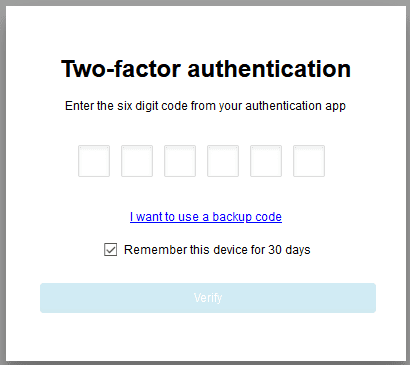
This second factor could be a one time code sent to your phone, an authentication app, or even biometric verification such as a fingerprint.
Enabling two factor authentication significantly reduces the risk of unauthorized access. Most major platforms such as email services, social media platforms, and banking apps offer this feature. Always activate it wherever possible.
3. Avoid Clicking Suspicious Links
Cybercriminals often use phishing techniques to trick users into clicking malicious links. These links may appear in emails, text messages, or social media posts and often look legitimate.
Clicking on such links can lead to fake websites designed to steal your personal information or download harmful software onto your device.
Always verify the source before clicking any link. If an email claims to be from a company, check the sender’s address carefully. Hover over links to see their actual destination before clicking.
When in doubt, visit the official website directly instead of using the provided link.
4. Keep Your Software and Devices Updated
Outdated software is one of the biggest security risks. Developers regularly release updates to fix vulnerabilities and improve security.
Ignoring these updates leaves your device exposed to known threats that hackers can easily exploit.
Make it a habit to update your operating system, browsers, antivirus software, and apps regularly. Enable automatic updates whenever possible so you do not miss critical security patches.
5. Use Secure and Trusted Networks
Public WiFi networks are convenient but often insecure. Hackers can easily intercept data transmitted over these networks, putting your personal information at risk.
Avoid accessing sensitive information such as banking details or passwords when connected to public WiFi. If you must use it, consider using a Virtual Private Network.
A VPN encrypts your internet connection, making it much harder for anyone to monitor your online activities or steal your data.
At home, ensure your WiFi network is secured with a strong password and modern encryption standards.
Read More On:
- How to Register a Business Name Officially: A Complete Step by Step Guide
- How to Start a Mobile Money Agent Business
6. Install Reliable Antivirus and Security Software
Antivirus software acts as a shield against malicious threats such as viruses, spyware, and ransomware.
A good security program can detect and remove harmful files before they cause damage. It can also warn you about suspicious websites and downloads.
Choose a reputable antivirus solution and keep it updated at all times. Regular scans can help identify potential threats early and keep your system clean.
7. Be Careful with Downloads
Downloading files from untrusted sources is a common way to introduce malware into your system. Free software, pirated content, and unknown attachments often carry hidden threats.
Always download files from official websites or trusted platforms. Before opening any file, scan it with your antivirus software.
Be especially cautious with email attachments, even if they appear to come from someone you know. Their account could have been compromised.
8. Limit the Information You Share Online
Oversharing personal information on the internet can make you an easy target for cybercriminals. Details such as your full name, address, phone number, and location can be used for identity theft or social engineering attacks.
Be mindful of what you post on social media. Adjust your privacy settings to control who can see your information.
Avoid sharing sensitive details unless absolutely necessary, and only on secure and trusted platforms.
9. Verify Website Security Before Entering Information
Before entering any personal or financial information on a website, ensure it is secure. A secure website uses encryption to protect your data.
Look for a padlock icon in the browser address bar and check that the URL begins with HTTPS. The extra S stands for secure and indicates that the connection is encrypted.
Avoid entering sensitive information on websites that do not meet these criteria.
Read More On:
- How to Create a PayPal Account That Receives Money in Any Country
- How to Use WhatsApp Business to Scale Your Sales
10. Log Out from Shared Devices
Using shared or public computers can expose your accounts if you forget to log out. The next user may gain access to your personal information.
Always log out from your accounts after using a shared device. Avoid saving passwords on public computers.
If possible, use private browsing mode to ensure that your session data is not stored.
11. Monitor Your Accounts Regularly
Regularly checking your online accounts can help you detect suspicious activity early. Unauthorized transactions or unfamiliar login attempts should be addressed immediately.
Set up alerts for your bank accounts and online services so you can receive notifications of unusual activity.
If you notice anything suspicious, change your passwords immediately and contact the service provider for assistance.
12. Educate Yourself About Cyber Threats
The digital world is constantly evolving, and so are cyber threats. Staying informed about the latest scams and security practices is essential.
Take time to learn about common threats such as phishing, ransomware, and identity theft. The more you know, the better you can protect yourself.
Follow trusted tech blogs, watch educational videos, and stay updated with cybersecurity news to remain ahead of potential risks.
Conclusion
Staying safe while browsing the internet requires awareness, caution, and the right tools. By implementing these twelve tips, you can significantly reduce your risk of falling victim to cyber threats.
Online safety is not a one time action. It is a continuous process that involves staying informed and practicing good digital habits every day.
Protect your personal information, stay alert, and make security a priority in all your online activities.
Read More On: