



If you’ve ever logged into Facebook and suddenly seen a message saying “Your account has been restricted”, you’re not alone. This is one of the most frustrating issues Facebook users face, especially for business owners, creators, and marketers who rely on the platform daily.
In this updated guide, I’ll break down why Facebook restricts accounts, what those restrictions really mean, and step-by-step actions you can take to recover your account and avoid future issues.
What Does “Facebook Account Restricted” Mean?
When Facebook restricts your account, it means the platform has temporarily limited what you can do. Depending on the violation, you may be unable to:
- Post, comment, or like content
- Send friend requests or messages
- Run ads or access Ads Manager
- Join or interact in groups
- Go live or monetize content
Restrictions can last a few hours, several days, weeks, or even permanently, depending on the severity and your account history.
Get TikTok SEO Cheat here
Common Reasons Facebook Restricts Accounts
Understanding the cause is the first step to solving the problem.
1. Violating Community Standards
This is the most common reason. It could involve:
- Posting misleading, spammy, or copied content
- Sharing content that Facebook flags as harmful or deceptive
- Repeatedly posting the same links or messages
Even unintentional violations can trigger restrictions
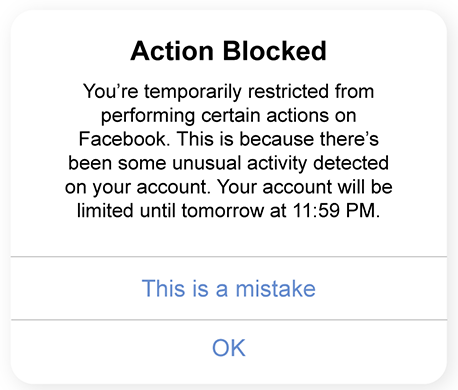
2. Suspicious or Unusual Activity
Facebook may restrict your account if it notices:
- Logging in from different devices or locations too often
- Rapid friend requests or group joins
- Automated tools or browser extensions acting like bots
This is often a security-related restriction.
3. Reports From Other Users
If multiple people report your posts, ads, or messages, Facebook may act first and review later. Sometimes genuine content still gets flagged due to mass reporting.
4. Advertising Policy Violations
For business accounts, common issues include:
- Disapproved ads repeated multiple times
- Misleading claims in ads
- Linking to low-quality or broken landing pages
Repeated ad issues can restrict both your ad account and personal profile.
5. New or Unverified Accounts
New accounts without:
- Profile photos
- Real names
- Friends or activity history
are more likely to be restricted automatically.
How to Check Why Your Account Is Restricted
Before taking action, confirm the exact reason.
Steps:
- Log into Facebook
- Go to Settings & Privacy
- Click Account Status or Support Inbox
- Review any violations or warnings listed
Facebook usually shows what rule was violated and how long the restriction will last.
Step-by-Step: How to Solve a Facebook Account Restriction
Step 1: Stay Calm and Don’t Panic
This is important. Avoid creating a new account immediately. Facebook can detect duplicate accounts and may permanently ban both.
Step 2: Submit an Appeal (If Available)
If Facebook gives you an “Appeal” or “Request Review” option, use it.
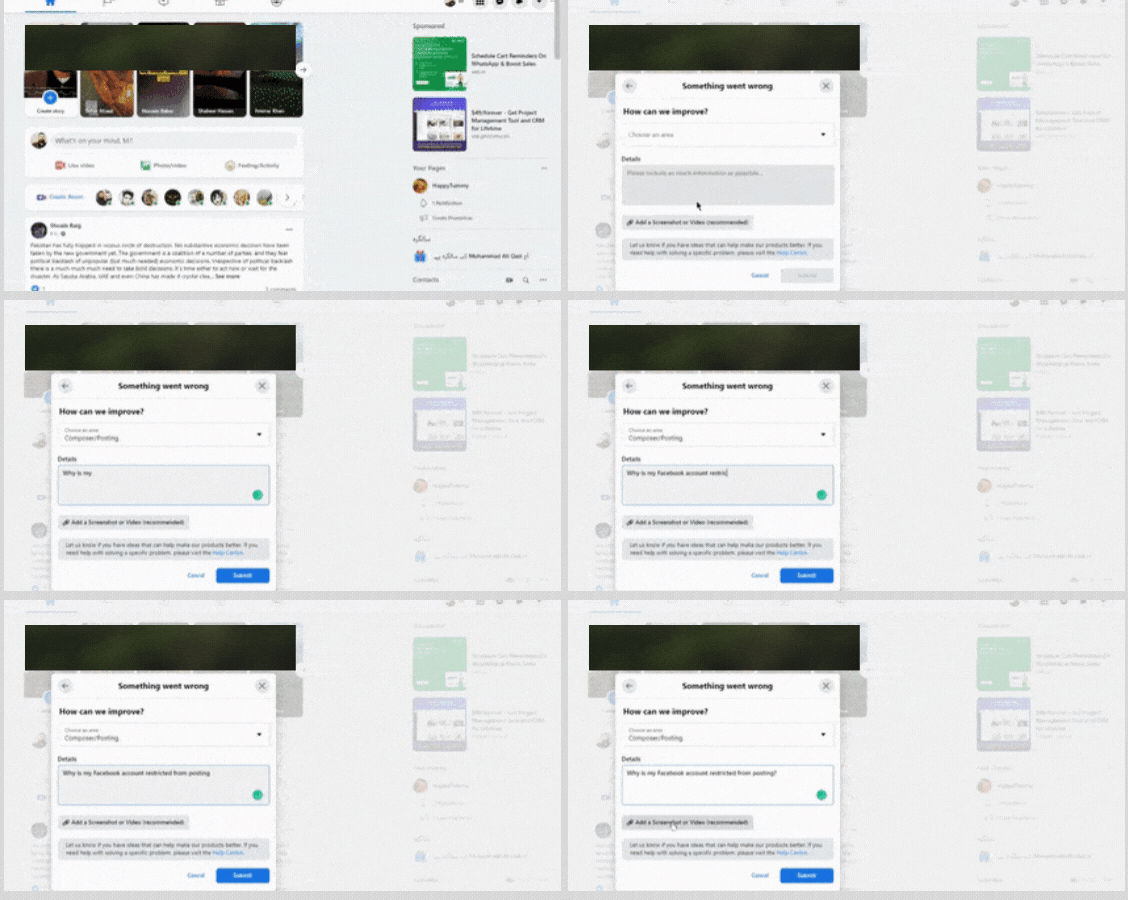
Tips for appeals:
- Be polite and brief
- Admit mistakes if any
- Avoid blaming Facebook
- Use clear, simple language
Example tone:
“I believe this restriction may be a mistake. I’ve reviewed the Community Standards and will ensure full compliance going forward.”
Step 3: Verify Your Identity
Some restrictions require identity confirmation.
You may be asked to:
- Upload a government-issued ID
- Confirm your phone number or email
- Complete security checks
Make sure your name on Facebook matches your ID.
Step 4: Wait Out the Restriction
If no appeal option exists, your best option may be to wait.
During this period:
- Do not attempt suspicious actions
- Avoid logging in repeatedly
- Don’t use automation tools
Trying to “force” activity can extend the restriction.
Step 5: Clean Up Your Account
While waiting, review and delete:
- Old spammy posts
- Repeated promotional content
- Links that look misleading
This reduces future risk once the restriction is lifted.
How Long Do Facebook Restrictions Last?
There’s no single answer, but generally:
- Minor issues: 24 hours – 7 days
- Repeated violations: 30 days or more
- Serious violations: Permanent restriction
Your account history plays a big role.
How to Prevent Future Facebook Restrictions
Prevention is better than recovery.
1. Follow Community Standards Strictly
Always review Facebook’s rules before posting sensitive or promotional content.
2. Avoid Automation and Spam Tools
Using third-party tools for:
- Auto-likes
- Auto-comments
- Mass messaging
is a major red flag.
3. Post Original, Valuable Content
Avoid copying captions, images, or links repeatedly. Original content builds trust with Facebook’s system.
4. Warm Up New Accounts
For new accounts:
- Add a real profile photo
- Connect with real friends
- Post naturally before promoting anything
5. For Ads: Fix Issues Before Reposting
If an ad is rejected:
- Edit it properly
- Understand the policy violation
- Don’t keep resubmitting the same ad
Final Thoughts
A Facebook account restriction is not the end. In most cases, it’s a warning to slow down, review the rules, and adjust how you use the platform.
If you treat Facebook like a long-term asset rather than a shortcut for quick results, you’ll reduce the chances of restrictions and build a safer, stronger presence.
What to do if the Facebook Account is locked temporary or permanent
Take Note: Issues with the temporary action restriction can also be reported to Facebook via Messenger live assistance.

