


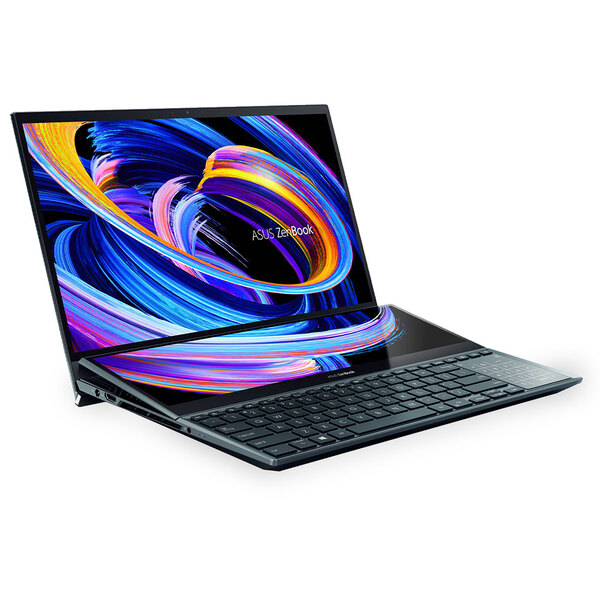
For years, dual screen laptops sat in an awkward position within the tech world. They looked futuristic, but often sacrificed practicality. Many felt like experimental devices rather than dependable daily machines. That narrative changes completely with the ASUS Zenbook DUO.
This device does not just refine the concept. It perfects it. ASUS has taken everything that previously felt forced about dual screen computing and turned it into something fluid, intuitive, and genuinely powerful. What you get here is not a novelty. It is a serious productivity tool that can confidently replace both a traditional laptop and an external monitor setup.
From design to performance to battery efficiency, this machine feels purpose built for professionals who demand flexibility without compromise.
The Design and Build
The Ceraluminum Identity
Get TikTok SEO Cheat here
The first interaction with the Zenbook DUO immediately communicates premium craftsmanship.
Ceraluminum Finish and Structural Integrity
ASUS introduces a unique material known as Ceraluminum. This is not just marketing language. It is a carefully engineered blend of ceramic and aluminum that delivers both lightness and durability.
The result is a chassis that feels incredibly refined in the hand. It resists fingerprints far better than traditional metal finishes, and it maintains a clean, professional look even after extended use. Scratches are less noticeable, and the texture adds a subtle grip that improves handling.
Despite housing two full displays, the device remains impressively lightweight. It does not feel like a burden in a backpack, which is crucial for mobile professionals in busy environments like Lagos.
Integrated Kickstand Engineering
One of the most important design elements is the built in kickstand. It is sturdy, well balanced, and engineered with precision.
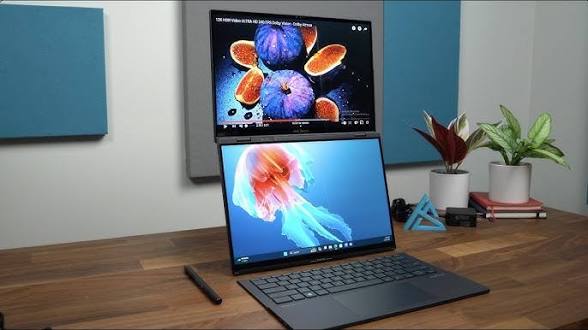
The adjustable angle allows multiple viewing configurations. You can position the device upright for dual screen productivity, tilt it slightly for creative work, or lay it flat for collaborative sessions. The hinge feels secure and does not wobble, even when tapping aggressively on the touchscreen.
This small detail dramatically enhances usability. It eliminates the need for external stands and makes the device adaptable in virtually any environment.
MagLatch Keyboard System
The detachable keyboard is where the Zenbook DUO truly separates itself from competitors.
It attaches magnetically to the lower screen and connects instantly through Pogo pins. There is no setup process, no pairing delay, and no guesswork. Once attached, it behaves like a traditional laptop keyboard.
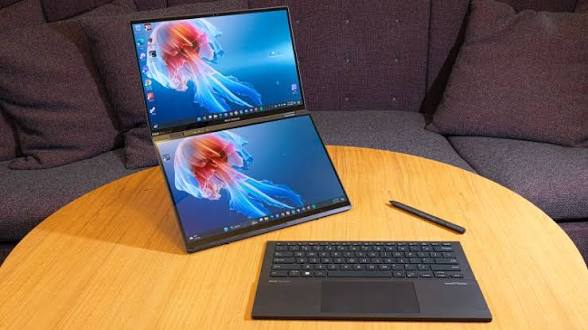
Detach it, and the experience transforms completely. You now have two full screens and a wireless keyboard that maintains strong connectivity. The typing experience remains excellent, with satisfying key travel and responsive feedback.
The Display Experience
Twice the OLED Excellence
The defining feature of the Zenbook DUO is its dual display system, and ASUS has executed this with remarkable precision.
Dual 14 Inch 3K OLED Panels
Both screens are identical in size and quality. This consistency matters more than it might seem. It ensures that colors, brightness, and contrast remain uniform across both displays.
The resolution delivers crisp visuals that are ideal for everything from document editing to high resolution video production. Text appears sharp, images are vibrant, and the viewing angles are excellent.
Color Accuracy and Visual Depth
These displays cover the full DCI P3 color space, making them highly reliable for creative professionals. Whether you are editing photos, grading videos, or designing graphics, you can trust what you see.
Blacks are deep and true, thanks to OLED technology. Highlights are bright without being harsh. The overall visual experience feels immersive and precise.
High Refresh Rate Fluidity
The refresh rate enhances responsiveness significantly. Scrolling feels smooth, animations are fluid, and multitasking becomes visually seamless.
This is particularly beneficial when using both screens simultaneously, as it reduces visual fatigue and improves overall efficiency.
Improved Anti Reflection Coating
Glare has always been a concern with glossy displays. ASUS addresses this with a refined coating that minimizes reflections.
While not completely matte, the screens are far more usable in bright environments than previous iterations. This makes a noticeable difference in office settings or outdoor use.
Virtual Keyboard and Touch Interaction
For users who prefer a fully digital setup, the virtual keyboard is surprisingly effective. It offers haptic feedback and accurate touch recognition.
This adds another layer of flexibility, allowing you to switch between physical and digital input depending on your workflow.
The Performance
Intelligent Power Meets Efficiency
Under the hood, the Zenbook DUO is powered by Intel Core Ultra architecture, designed for modern workloads.
AI Driven Processing
The inclusion of a dedicated Neural Processing Unit transforms how tasks are handled. AI features such as background noise removal, video enhancements, and real time processing run efficiently without draining the battery.
This is particularly useful for professionals who rely on video conferencing or content creation tools.
Graphics Capabilities
The integrated Intel Arc graphics deliver performance that rivals entry level dedicated GPUs. This means you can edit high resolution videos, run demanding applications, and even enjoy casual gaming without performance issues.
For a device of this form factor, the graphical power is impressive.
Memory and Storage Efficiency
With high speed LPDDR5x memory and fast SSD storage, the system handles heavy multitasking effortlessly.
Opening multiple applications, switching between screens, and managing large files feels smooth and responsive. There is no noticeable lag, even under demanding conditions.
Versatile Modes
One Device, Multiple Workflows
The Zenbook DUO is not just a laptop. It is a flexible workstation that adapts to your needs.
Laptop Mode
Attach the keyboard and use it like a traditional laptop. This is perfect for quick tasks and familiar workflows.
Dual Screen Mode
Detach the keyboard and unlock the full potential of both displays. This setup is ideal for multitasking, research, and content creation.
Desktop Mode
Position the screens vertically for extended workspace. Writers, programmers, and analysts will find this incredibly useful for viewing long documents or code.
Sharing Mode
Lay the device flat and present content to others. This is perfect for meetings, collaborations, and client interactions.
The Battery Life
Power That Matches the Ambition
Despite its dual screen setup, the Zenbook DUO delivers impressive battery performance.
With a large capacity battery, it comfortably supports a full day of moderate use. Even with both screens active, it maintains respectable longevity.
This balance between performance and efficiency is one of the device’s strongest advantages. It allows users to stay productive without constantly searching for power outlets.
ASUS Zenbook DUO Specifications Table
| Feature | Specification |
|---|---|
| CPU | Intel Core Ultra Series |
| GPU | Intel Arc Graphics |
| Display | Dual 14 inch 3K OLED |
| RAM | 32GB LPDDR5x |
| Storage | Up to 2TB SSD |
| Weight | Approx 1.35 kg |
| Battery | 99Wh |
| Keyboard | Detachable Bluetooth with magnetic connection |
| Price in Nigeria | Approx ₦3,800,000 to ₦4,500,000 |
User Experience
Living With the Zenbook DUO
Daily use reveals the true strength of this machine.
Switching between modes becomes second nature. The system feels intuitive, not forced. Multitasking is not just easier, it is more enjoyable.
Professionals who manage multiple tasks simultaneously will appreciate how much time this device saves. Creatives will love the display quality. Students and remote workers will benefit from the flexibility.
Pros and Cons
Pros
- Exceptional multitasking capabilities with dual full size displays
- Premium build quality with durable materials
- Highly versatile design that adapts to different workflows
- Strong performance with efficient AI integration
- Reliable battery life for a dual screen device
Cons
- Premium pricing may limit accessibility
- Slightly thicker than traditional ultrabooks
- Occasional delay when switching to wireless keyboard mode
A Category Defining Device
The ASUS Zenbook DUO stands as one of the most innovative and practical laptops available.
It successfully bridges the gap between experimentation and real world usability. It is not trying to impress with flashy ideas. It delivers meaningful improvements that enhance productivity.
For users who need flexibility, power, and a modern workflow experience, this device is more than worth considering. It is not just a laptop. It is a complete productivity ecosystem in a single portable form.
Read More On:

