


For years, the premium laptop industry has been trapped in a relentless pursuit of thinness. Manufacturers have aggressively shaved millimeters off chassis designs while marketing portability as the pinnacle of innovation. Yet behind many of these sleek machines lies an unavoidable compromise. Reduced thermal headroom often means restrained processor performance, throttled graphics output, excessive fan noise, and shorter sustained workload capability. The modern ultra portable may look futuristic on a coffee table, but under demanding professional pressure, many of them simply cannot maintain peak speeds for long durations.
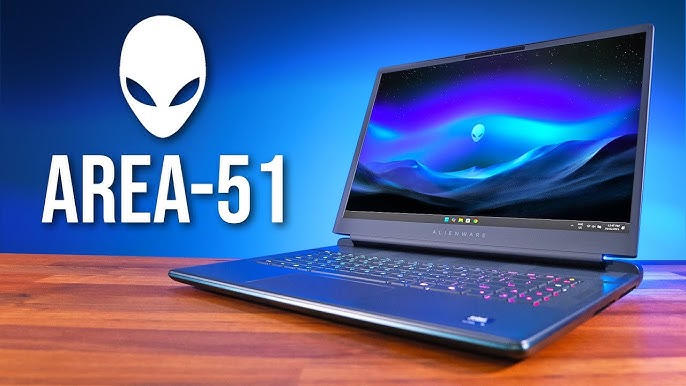
That is precisely where the Alienware 16 Area 51 enters the conversation with unapologetic confidence.
This machine does not attempt to imitate an ultrabook. It does not prioritize slimness over capability, nor does it pretend that high performance computing can exist without proper cooling architecture. Instead, Alienware has engineered a system that proudly embraces size, thermal volume, and desktop class power delivery in pursuit of one singular objective: uncompromised performance.
The result is a machine that feels less like a traditional gaming laptop and more like a self contained battle station engineered for creators, software engineers, competitive gamers, 3D artists, AI developers, and professionals whose workflows continuously punish conventional portable systems.
Get TikTok SEO Cheat here
This is not merely a gaming notebook with RGB lighting and premium branding. It is a fully realized desktop replacement that combines an extreme power envelope, advanced cooling architecture, flagship silicon, and one of the most visually stunning laptop displays ever integrated into a mobile workstation chassis.
In this exhaustive Alienware 16 Area 51 review, we will deeply examine every aspect of the machine, including its industrial design philosophy, display technology, thermal engineering, mechanical keyboard experience, graphics capability, processing strength, battery realities, connectivity architecture, and real world usability.
By the end of this evaluation, it becomes very clear that the Alienware 16 Area 51 is not trying to compete with thin notebooks.
It is attempting to replace your desktop entirely.
The Design Philosophy
The first encounter with the Alienware 16 Area 51 immediately communicates one thing: this machine was never designed to disappear into the background.
Its presence is commanding.
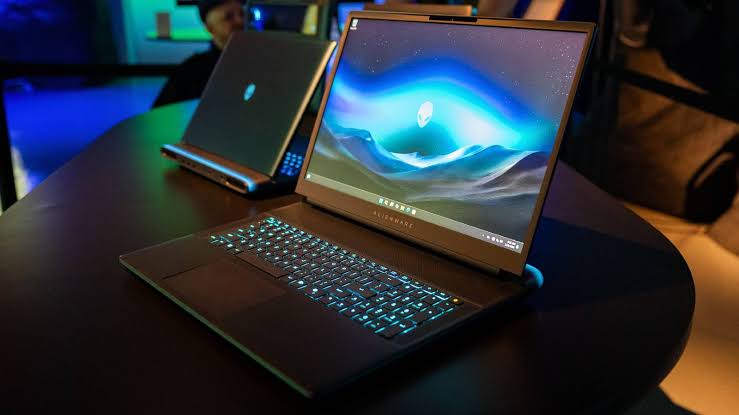
Alienware has embraced a bold interstellar aesthetic language that feels mechanical, futuristic, and intentionally aggressive. The chassis carries a sculpted appearance with deeply curved contours, smooth structural transitions, and a visually striking Liquid Teal finish that subtly shifts tone depending on environmental lighting.
Unlike minimalist laptops that attempt to hide their performance intentions, the Area 51 openly celebrates its engineering.
A Chassis Designed Around Cooling
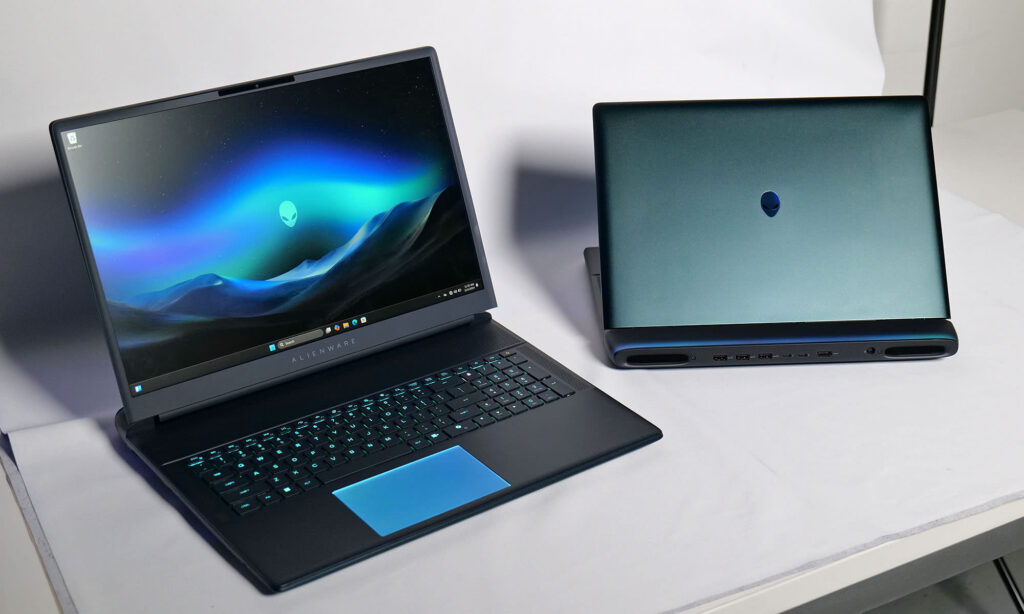
Perhaps the most visually distinctive element is the enlarged rear thermal extension positioned behind the display hinge. This structural protrusion is not decorative. It exists for airflow efficiency and thermal separation.
By extending the rear section outward, Alienware creates additional space for:
| Structural Element | Purpose |
|---|---|
| Expanded exhaust vents | Improves heat expulsion |
| Larger internal vapor chamber | Enhances thermal transfer |
| Additional airflow channels | Reduces internal heat saturation |
| Rear positioned ports | Keeps cables away from workspace |
The result is a machine that pushes hot air backward rather than upward toward the display or sideways toward the user’s hands.
During extended rendering sessions or intensive gaming workloads, this design dramatically improves comfort.
AlienFX Lighting
RGB Engineering Taken Seriously
Alienware has always treated lighting as part of the overall identity rather than an afterthought, and the Area 51 elevates this philosophy significantly.
The rear perimeter lighting system sits beneath a translucent diffusion layer that creates smooth atmospheric glow transitions rather than harsh RGB hotspots.
The visual effect resembles a soft aurora radiating from the rear chassis.
Even more impressive is the inclusion of independently illuminated intake fan regions above the keyboard deck. Watching the internal cooling system pulse with synchronized lighting patterns creates a uniquely futuristic aesthetic rarely seen in laptops.
Unlike many gaming systems where RGB feels excessive or distracting, the lighting implementation here feels integrated into the machine’s engineering identity.
Display Excellence
The 240Hz Matte OLED Revolution
One of the biggest historical criticisms surrounding high performance gaming laptops has always been display quality.
Manufacturers frequently prioritized raw performance while neglecting panel sophistication.
Alienware decisively changes that narrative.
The Alienware 16 Area 51 features a breathtaking 16 inch WQXGA OLED panel with a resolution of 2560 x 1600 and a 16:10 aspect ratio.
This display is extraordinary.
The Matte OLED Advantage
OLED technology already offers several inherent strengths:
| OLED Benefit | Real World Impact |
|---|---|
| Infinite contrast ratio | Perfect black levels |
| Individual pixel illumination | Superior HDR rendering |
| Exceptional color vibrancy | Enhanced creative workflows |
| Near instant response time | Reduced motion blur |
However, Alienware introduces something even more significant here.
A matte anti glare coating.
Most OLED laptops use glossy finishes that become highly reflective under office lighting or daylight conditions. Alienware solves this issue without severely compromising color richness.
The result is a display that remains visually immersive while also becoming practical for professional productivity environments.
240Hz Refresh Rate and 0.2ms Response Time
The motion clarity is phenomenal.
The 240Hz refresh rate combined with an astonishing 0.2ms response time produces exceptionally fluid visual movement.
Fast paced competitive gaming feels incredibly responsive.
Camera panning appears silky smooth.
Motion blur becomes nearly nonexistent.
Even simple desktop interactions feel unusually fluid due to the high refresh responsiveness.
For esports professionals or competitive gamers, this level of responsiveness creates a measurable improvement in visual tracking precision.
HDR Performance and Brightness
The display reaches approximately 620 nits during HDR peak brightness scenarios.
That allows:
- Strong highlight separation
- Excellent shadow detail
- Rich cinematic contrast
- Impressive HDR gaming immersion
Dark scenes appear genuinely dark rather than gray washed.
Explosions, reflections, and bright environmental effects possess remarkable intensity.
For content creators handling photo grading or cinematic editing, this display becomes a serious productivity asset rather than merely a gaming feature.
Keyboard Experience
Mechanical Excellence in a Laptop
The keyboard experience on the Alienware 16 Area 51 is among the finest currently available in mobile computing.
Alienware integrates authentic Cherry MX ultra low profile mechanical switches, delivering tactile precision rarely achievable in laptops.
Deep Key Travel and Tactile Satisfaction
Many laptop keyboards feel shallow and lifeless.
This keyboard does not.
With approximately 1.8mm of travel distance, each keystroke feels deliberate, responsive, and satisfying.
Typing becomes:
- More accurate
- Less fatiguing
- More enjoyable
- Mechanically reassuring
Software developers writing extensive codebases, writers producing lengthy documents, or professionals managing constant communication workflows will immediately appreciate the superior tactile feedback.
The switches also provide a distinctly audible click response that feels premium without becoming excessively disruptive.
Trackpad Quality
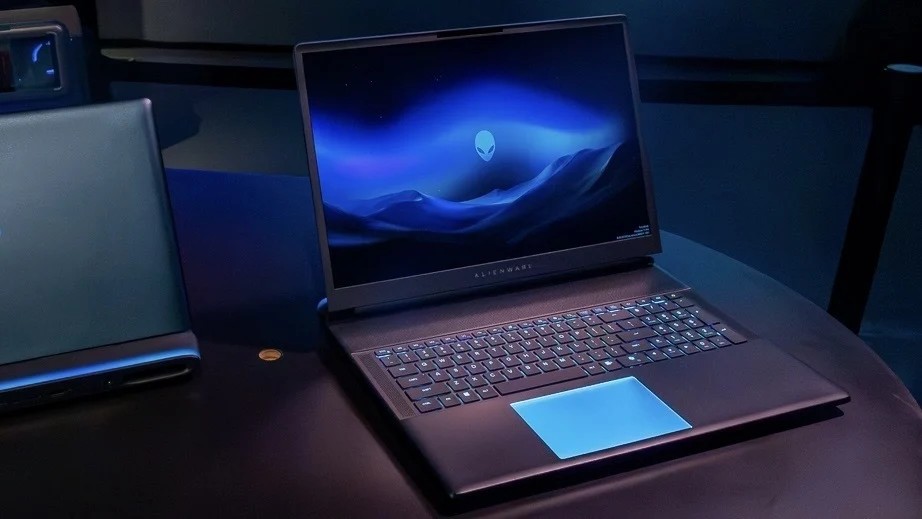
Due to the extensive thermal architecture above the keyboard, the trackpad remains somewhat compact.
However, the glass surface feels exceptionally smooth and precise.
Gesture recognition remains responsive, and the illuminated trackpad implementation adds visual uniqueness without sacrificing functionality.
Thermal Engineering
The Cryo Chamber Breakthrough
Thermals define whether a high performance laptop succeeds or fails.
The Alienware 16 Area 51 succeeds impressively.
Advanced Vapor Chamber Cooling
Alienware utilizes a redesigned Cryo Chamber thermal module featuring expanded copper vapor chambers and optimized airflow pathways.
This allows the system to sustain extremely high power delivery without catastrophic thermal saturation.
Cooling Architecture Breakdown
| Cooling Component | Functionality |
|---|---|
| Dual intake fans | Pull cool air efficiently |
| Quad exhaust system | Rapid heat evacuation |
| Copper vapor chambers | Accelerated heat distribution |
| Expanded airflow channels | Reduced hotspot concentration |
| Rear exhaust orientation | Improved user comfort |
Alienware claims a major airflow improvement over previous generations, and real world usage strongly supports this.
Sustained Performance Stability
What truly separates the Area 51 from thinner competitors is sustained load consistency.
Many slim gaming laptops advertise impressive benchmark numbers that collapse after prolonged workloads due to thermal throttling.
The Area 51 maintains stability far more effectively.
Even during extended rendering sessions, internal temperatures remain controlled enough to preserve high clock speeds consistently.
Core temperatures hovering around the mid 80 degree Celsius range under extreme workloads demonstrate impressive thermal efficiency considering the power envelope involved.
Fan Noise Characteristics
Yes, the fans become audible during intense workloads.
However, the sound profile remains smooth and controlled rather than irritating.
Importantly:
- No aggressive high pitched whining
- No unstable RPM fluctuations
- No sudden acoustic spikes
The cooling acoustics resemble controlled white noise rather than mechanical turbulence.
That distinction matters significantly during prolonged usage.
Hardware Performance
Desktop Class Muscle
This is where the Alienware 16 Area 51 truly separates itself from ordinary premium laptops.
Its internal hardware configuration is absurdly powerful.
Intel Core Ultra 9 290HX Plus
The machine utilizes the flagship Intel Core Ultra 9 290HX Plus, engineered for elite multi threaded performance.
This processor handles:
- Massive code compilation
- Complex simulations
- Professional rendering
- Heavy multitasking
- Virtual machine deployment
- AI accelerated workflows
with startling speed.
The processor excels particularly under sustained workloads where thermal stability allows it to maintain higher performance levels over time.
For developers, engineers, video editors, and workstation users, this matters far more than short burst benchmark spikes.
RTX 5090 Laptop GPU
Extreme Mobile Graphics
The inclusion of the Nvidia GeForce RTX 5090 Laptop GPU immediately positions the Area 51 at the highest tier of mobile graphics computing.
The GPU operates with a massive 175W Total Graphics Power allocation.
That enormous power budget allows the graphics processor to sustain substantially higher performance than lower wattage implementations found in thinner laptops.
Real World Graphics Capability
| Task Type | Performance Experience |
|---|---|
| AAA gaming | Ultra settings with excellent frame rates |
| Ray tracing | Smooth real time lighting effects |
| 3D rendering | Accelerated viewport responsiveness |
| AI workloads | Faster local inference tasks |
| Video production | Hardware accelerated exports |
| CAD visualization | Fluid complex scene handling |
This machine is not merely suitable for gaming.
It functions as a portable rendering workstation.
Complete Technical Specifications
Official Hardware Configuration
| Component | Specification |
|---|---|
| Operating System | Windows 11 Home or Professional |
| Processor | Intel Core Ultra 9 290HX Plus |
| Graphics | Nvidia GeForce RTX 5090 Laptop GPU |
| VRAM | 24GB GDDR7 |
| GPU Power Allocation | 175W TGP |
| Display | 16 inch WQXGA Matte OLED |
| Resolution | 2560 x 1600 |
| Refresh Rate | 240Hz |
| Response Time | 0.2ms |
| Peak HDR Brightness | 620 nits |
| Memory | Up to 64GB DDR5 6400MHz |
| Storage | Up to 12TB PCIe Gen 4 SSD |
| Networking | Wi Fi 7 + Bluetooth 5.4 |
| Webcam | 4K IR Camera |
| Battery | 96WHr |
| Power Adapter | 360W |
| Weight | 7.49 pounds |
Connectivity and Port Selection
One major advantage of larger laptops is expanded I O capability.
Alienware fully capitalizes on that opportunity.
Rear Positioned Connectivity
The rear mounted port arrangement dramatically improves cable management.
Rear I O Includes
| Port Type | Quantity |
|---|---|
| Thunderbolt 5 USB C | 2 |
| USB A 3.2 Gen 1 | 3 |
| HDMI 2.1 | 1 |
| DC Power Input | 1 |
This configuration keeps workspace organization clean while enabling extensive peripheral connectivity.
Creator Friendly Accessibility
The left side houses:
- Full sized SD card slot
- 3.5mm audio combo jack
The SD card reader is especially valuable for photographers and videographers transferring large media libraries.
Battery Life and Portability Reality
The Alienware 16 Area 51 is portable in the technical sense.
But this is not an ultraportable lifestyle machine.
It is a transportable workstation.
Battery Expectations
With a 96WHr battery, general productivity usage can approach several hours under balanced power profiles.
However, once the RTX 5090 and Intel processor begin operating aggressively, battery depletion accelerates rapidly.
Typical Usage Expectations
| Usage Scenario | Estimated Longevity |
|---|---|
| Basic productivity | Around 3 hours |
| Video streaming | Up to 6 hours |
| Gaming | Approximately 1 to 2 hours |
| Heavy rendering | Very limited unplugged duration |
This system is clearly engineered for plugged in dominance rather than all day battery endurance.
The 360W Power Adapter
The included 360W adapter is enormous.
There is no hiding that reality.
However, it exists because the hardware genuinely requires extreme power delivery for unrestricted operation.
USB C charging remains available for lighter workloads, but maximum performance requires the dedicated adapter.
Who Is This Laptop Actually For?
The Alienware 16 Area 51 targets a very specific audience.
It is ideal for:
- Competitive gamers
- Professional streamers
- 3D artists
- Software engineers
- AI developers
- Video editors
- Simulation professionals
- Users replacing desktop towers entirely
It is not ideal for users prioritizing:
- Lightweight travel
- Silent operation
- Minimal desk presence
- Extended battery portability
This machine prioritizes power first.
Everything else is secondary.
Final Verdict
The Alienware 16 Area 51 represents one of the purest desktop replacement philosophies currently available in mobile computing.
Rather than chasing impossible thinness, Alienware fully embraces thermal engineering, structural volume, and extreme power delivery to achieve performance levels that genuinely rival desktop systems.
The combination of:
- RTX 5090 graphics
- Intel Core Ultra 9 processing
- Advanced Cryo Chamber cooling
- 240Hz matte OLED brilliance
- Mechanical Cherry MX keyboard integration
creates a machine that feels purpose built for enthusiasts who demand maximum capability without compromise.
Yes, it is heavy.
Yes, it is large.
Yes, the power brick is enormous.
But those realities are direct consequences of engineering priorities centered around sustained elite performance.
For users who refuse to tolerate throttling, reduced wattage GPUs, or compromised thermals, the Alienware 16 Area 51 may very well be the definitive desktop replacement currently available.
And in a market increasingly obsessed with thinness over capability, that unapologetic philosophy feels refreshingly bold.
Read More On:

