


The smartphone software industry has entered an era where raw hardware alone is no longer enough to impress users. Modern flagship devices are now judged by the intelligence of their software, the smoothness of their animations, the practicality of their AI tools, and how naturally the interface blends into daily life. This is exactly where OxygenOS 16.1 positions itself as one of the most ambitious mobile operating systems ever created by OnePlus.
For years, OxygenOS built its reputation on speed, minimalism, and clean software execution. However, as the ecosystem evolved and competitors introduced more advanced AI ecosystems and deeper customization, OnePlus faced increasing criticism from longtime fans who believed the software had lost its original identity. OxygenOS 16.1 changes that narrative completely.
Instead of focusing purely on visual redesigns, OnePlus has refined the entire software experience from the ground up. Every swipe feels more responsive. Every transition appears more natural. Every animation reacts with a fluidity that creates the illusion of physical movement rather than digital motion. The operating system feels luxurious without becoming heavy, intelligent without becoming intrusive, and feature packed without overwhelming the user.
What truly separates OxygenOS 16.1 from previous versions is its ability to merge productivity, entertainment, personalization, and AI into a unified ecosystem. The operating system no longer behaves like a simple launcher sitting on top of Android. It behaves like an intelligent assistant that adapts to how users work, communicate, consume content, and multitask throughout the day.
Get TikTok SEO Cheat here
From the revolutionary Live Space interface to advanced offline AI translation tools, from deeply optimized thermal management to the visually stunning Luminous Rendering Engine, OxygenOS 16.1 delivers one of the most polished smartphone experiences currently available.
This detailed review explores every major feature, performance improvement, and hidden advantage that makes OxygenOS 16.1 a defining software experience for premium OnePlus smartphones.
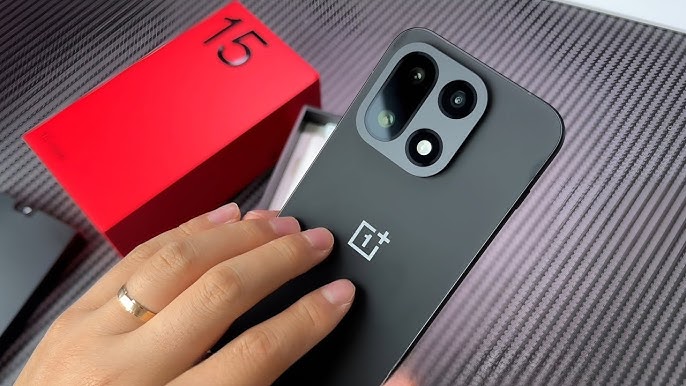
Complete Device Specifications for the OnePlus 15
Since OxygenOS 16.1 reaches its full potential on the flagship OnePlus 15 series, understanding the hardware behind the software experience is essential.
| Specification | Details |
|---|---|
| Device | OnePlus 15 |
| Display | 6.82 inch AMOLED LTPO Panel |
| Resolution | 3200 × 1440 |
| Refresh Rate | Adaptive 1Hz to 144Hz |
| Processor | Snapdragon Elite Series Chipset |
| GPU | Adreno Graphics Engine |
| RAM Options | 12GB / 16GB / 24GB |
| Storage Options | 256GB / 512GB / 1TB |
| Battery | 6200mAh |
| Charging | 120W Wired Fast Charging |
| Wireless Charging | 65W AirVOOC |
| Rear Cameras | 50MP Main + 50MP Ultra Wide + 64MP Periscope |
| Front Camera | 32MP Selfie Sensor |
| Operating System | OxygenOS 16.1 |
| Connectivity | WiFi 7, Bluetooth 6, NFC, 5G |
| Security | Ultrasonic In Display Fingerprint |
| Cooling System | Vapor Chamber Liquid Cooling |
The Luminous Rendering Engine
Where Speed Meets Elegance
The foundation of OxygenOS 16.1 is the new Luminous Rendering Engine, which completely transforms how the operating system behaves visually and interactively.
Unlike traditional Android animations that simply move from one frame to another, the Luminous Engine creates what OnePlus describes as “physics aware motion.” This means animations respond dynamically to touch velocity, gesture direction, and interaction timing.
Opening an application feels incredibly responsive because the animation accelerates naturally with your finger movement. Closing apps feels equally satisfying because the software adds realistic motion curves that mimic real world physical behavior.
The result is an operating system that feels astonishingly alive.
Scrolling through social media feeds becomes smoother. Multitasking windows glide effortlessly across the screen. Even simple actions like adjusting brightness or pulling down notifications feel more premium than before.
OnePlus has also dramatically reduced animation latency. There is virtually no jitter during fast gestures, even when dozens of apps remain active in memory simultaneously.
Live Space
OnePlus Reinvents the Lockscreen Experience
The centerpiece feature of OxygenOS 16.1 is undoubtedly Live Space.
Rather than copying existing notification systems, OnePlus redesigned how information appears on the lockscreen entirely. Live Space transforms passive notifications into active, interactive experiences.
How Live Space Works
At the bottom of the lockscreen sits a sleek adaptive capsule interface capable of displaying real time information without interrupting the wallpaper or cluttering the screen.
Examples include:
| Live Activity | Function |
|---|---|
| Food Delivery Tracking | Displays rider movement and ETA |
| Music Playback | Shows album art and synchronized lyrics |
| Sports Scores | Displays live match updates |
| Navigation | Shows turn by turn guidance |
| Timers | Displays countdown progress |
| Voice Recording | Shows waveform activity |
The implementation feels remarkably polished.
Instead of repeatedly unlocking the phone to check updates, users can interact directly with ongoing activities from the lockscreen itself.
The immersive music interface is especially impressive. When music playback is active, the lockscreen dynamically adapts its color palette to match the album artwork. Lyrics animate smoothly across the screen while background blur effects create an elegant visual atmosphere.
This feature alone gives OxygenOS 16.1 a stronger sense of identity than many competing Android skins.
AI Features That Actually Improve Productivity
Artificial intelligence has become a major selling point in modern smartphones, but many brands implement AI features that feel unnecessary or gimmicky. OxygenOS 16.1 avoids that mistake by focusing on practical intelligence.
AI Translate
One of the standout features is the upgraded AI Translate tool.
The software can instantly translate restaurant menus, signs, documents, and printed text in real time. What makes this feature exceptional is its offline functionality.
Even without internet access, users can point the camera toward foreign text and receive:
- Instant language translation
- Food image previews
- Currency conversions
- Allergen alerts
- Pronunciation assistance
For travelers and international business professionals, this becomes incredibly useful.
AI Document Reconstruction
The document scanning system is equally impressive.
If a user scans a folded receipt, crumpled paper, or poorly lit document, OxygenOS intelligently reconstructs the image by:
- Removing shadows
- Straightening perspective distortion
- Enhancing text clarity
- Rebuilding damaged edges
- Exporting searchable PDF files
The final output often looks cleaner than the original physical document itself.
AI Summary Tools
The AI Menu system introduces intelligent summarization across applications.
Users can summarize:
- Long web articles
- Meeting transcripts
- Lecture notes
- Video captions
- Research documents
Instead of overwhelming users with lengthy text, the software generates concise key points that are genuinely useful for productivity focused users.
Battery Optimization and Thermal Performance
Despite the extensive visual enhancements, OxygenOS 16.1 remains highly power efficient.
OnePlus has redesigned background process management to prioritize frequently used applications while intelligently limiting unnecessary resource consumption.
The result is:
| Optimization Area | Improvement |
|---|---|
| App Retention | More apps remain active in memory |
| Gaming Stability | Reduced frame drops |
| Heat Management | Lower surface temperatures |
| Standby Drain | Improved overnight battery retention |
| Hotspot Efficiency | Better sustained 5G performance |
Even during demanding gaming sessions or prolonged hotspot usage, thermal throttling remains impressively controlled.
Advanced Personalization Features
OxygenOS 16.1 introduces a stronger focus on visual organization and user customization.
Color Based App Sorting
Users can organize applications by:
- Category
- Usage frequency
- App color
This surprisingly practical feature allows users to locate apps faster based on visual memory rather than alphabetical searching.
Master Camera Presets
Photography enthusiasts receive substantial upgrades as well.
Users can now save advanced manual camera configurations including:
- ISO levels
- Shutter speed
- White balance
- Color grading
- Focus preferences
These presets can even be shared with other users through QR code exports embedded directly into photos.
This creates an entire ecosystem for mobile photography creators.
OxygenOS 16.1 Compatibility List
| Device | Update Status |
|---|---|
| OnePlus 15 | Stable |
| OnePlus 15R | Stable |
| OnePlus 13 | Stable |
| OnePlus 13s | Stable |
| OnePlus Open | Beta |
| OnePlus Pad 3 | Stable |
| OnePlus Pad 2 | Stable |
| OnePlus Nord 6 | Upcoming |
Final Verdict
OxygenOS 16.1 is not merely another Android update. It represents a complete refinement of the OnePlus software philosophy.
The operating system successfully combines:
- Exceptional animation smoothness
- Practical AI integration
- Strong thermal efficiency
- Elegant visual design
- Deep customization options
- Improved multitasking performance
Most importantly, OxygenOS 16.1 feels intentional. Every feature appears thoughtfully designed rather than added simply for marketing purposes.
The Live Space ecosystem transforms lockscreen interaction into something genuinely useful. The Luminous Rendering Engine delivers one of the smoothest Android experiences currently available. The AI productivity tools save real time in everyday usage scenarios.
For OnePlus users seeking a premium software experience that balances speed, intelligence, beauty, and practicality, OxygenOS 16.1 stands as one of the finest mobile operating systems available today.
Read More On:

