

MOBILE OPTIMIZATION & USER EXPERIENCE SEO CHECKLIST
Why Mobile Optimization Matters in Modern SEO: Mobile optimization is no longer optional, it is the default standard for ranking.
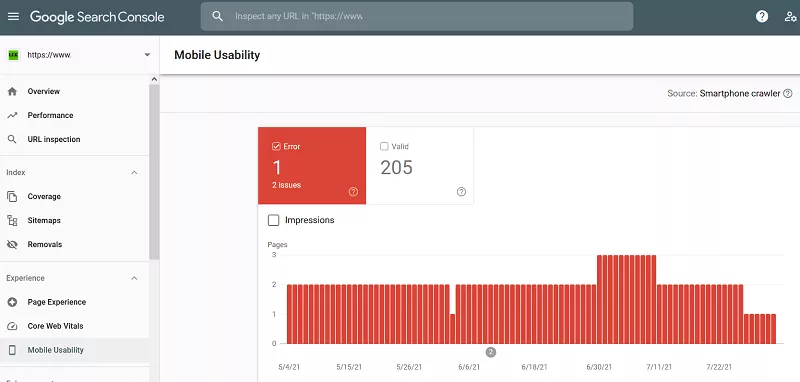
Google uses mobile-first indexing, meaning it evaluates the mobile version of your website first before the desktop version.
If your site performs poorly on mobile, your rankings will suffer even if the desktop experience is perfect.
Modern SEO success depends heavily on how users experience your website on:
- Smartphones
- Tablets
- Mobile browsers with slower networks
With the URL Inspection Tool in Google Search Console, you can understand the way Google sees a specific page rendered on different mobile devices.
29. Mobile Usability Optimization (Core Ranking Factor)
Mobile usability refers to how easily users can interact with your website on mobile devices.
A mobile-friendly site should ensure:
- Text is readable without zooming
- Buttons are easy to tap
- Content fits the screen properly
- No horizontal scrolling is required
- Pages load quickly on mobile networks
Why this matters:
A poor mobile experience increases bounce rate, which signals to Google that users are not satisfied with your page.
Better usability leads to:
- Higher engagement
- Longer time on page
- Improved conversion rates
- Stronger rankings
30. Responsive Design (Single Website for All Devices)
Responsive design ensures your website automatically adapts to different screen sizes.
Instead of creating separate mobile and desktop versions, a responsive website adjusts layout, images, and text dynamically.
Benefits:
- Better user experience across all devices
- Easier maintenance (one website instead of two)
- Improved SEO performance
- Faster indexing by search engines
Google strongly recommends responsive design as the preferred mobile configuration.
31. Page Experience and User Engagement Signals
User experience (UX) is now a major ranking factor in SEO.
Google evaluates how users interact with your pages, including:
- How long they stay on your site
- Whether they interact with your content
- Whether they return to search results quickly
Key UX improvement areas:
- Clean and simple page layout
- Easy navigation structure
- Fast loading pages
- Minimal distractions
- Clear content hierarchy
A good user experience increases engagement signals that support higher rankings.
32. Mobile Page Speed Optimization
Speed is even more critical on mobile devices because users often browse on slower networks.
Key optimization techniques:
- Compress images for mobile display
- Reduce unnecessary scripts
- Enable lazy loading for media
- Use lightweight themes and frameworks
- Minimize redirects
A faster mobile experience reduces bounce rate and improves ranking signals.
33. Voice Search Optimization (Growing SEO Trend)
Voice search is becoming increasingly common through mobile devices and smart assistants.
Users now search in a more conversational way, such as:
- “What is the best SEO checklist for beginners?”
- “How do I improve my website ranking?”
To optimize for voice search:
- Use natural, conversational language
- Answer questions clearly and directly
- Structure content in FAQ format
- Target long-tail keywords
Voice search favors content that is direct, simple, and easy to understand.
34. Mobile-Friendly Content Formatting
Content must be designed for easy mobile reading.
Best practices:
- Use short paragraphs
- Break content into clear sections
- Use bullet points and lists
- Avoid large blocks of text
- Use clear headings for scanning
Mobile users typically skim content, so readability is critical for engagement.
35. Accelerated Mobile Performance (Modern Alternative to AMP)
While AMP (Accelerated Mobile Pages) was once popular, modern SEO focuses more on Core Web Vitals and responsive performance rather than AMP itself.
Instead of relying on AMP, focus on:
- Fast-loading responsive pages
- Optimized media delivery
- Clean code structure
- Efficient caching systems
Google now prioritizes real-world performance over AMP implementation.
36. Intrusive Interstitials (Pop-up Control)
Intrusive interstitials are large pop-ups that block content immediately after a page loads.
Why they are harmful:
- Disrupt user experience
- Increase bounce rates
- Reduce content accessibility
Best practice:
- Avoid pop-ups that appear immediately on page load
- If needed, delay them until user interaction
- Ensure they do not cover main content
A clean, uninterrupted experience improves both UX and SEO performance.
37. Mobile Navigation and User Flow Optimization
Navigation should be simple and intuitive on mobile devices.
Best practices:
- Use a clear menu structure
- Keep navigation limited to essential links
- Use a sticky or collapsible menu if needed
- Ensure users can reach important pages quickly
Good navigation reduces friction and improves engagement signals.
38. Content Accessibility Across Devices
Accessibility ensures your website can be used by all users, including those with disabilities or limitations.
Key accessibility improvements:
- Proper contrast between text and background
- Alt text for images
- Readable font sizes
- Logical heading structure
- Keyboard-friendly navigation
Accessible websites are easier to use and often perform better in search rankings.
39. Reducing Mobile Bounce Rate
Bounce rate reflects how quickly users leave your website after landing. High bounce rates on mobile can signal poor user experience.
Ways to reduce bounce rate:
- Improve page speed
- Match content to search intent
- Use engaging introductions
- Avoid intrusive ads or pop-ups
- Ensure content loads properly on all devices
Lower bounce rates often correlate with improved rankings.